<?xml version="1.0" encoding="utf-8"?>
<feed xmlns="http://www.w3.org/2005/Atom">

  <title><![CDATA[PND4]]></title>
  <link href="http://www.pnd4.net/atom.xml" rel="self"/>
  <link href="http://www.pnd4.net/"/>
  <updated>2017-01-02T22:29:14-08:00</updated>
  <id>http://www.pnd4.net/</id>
  <author>
    <name><![CDATA[pnd4]]></name>
    <email><![CDATA[kevin@pnd4.net]]></email>
  </author>
  <generator uri="http://octopress.org/">Octopress</generator>

  
  <entry>
    <title type="html"><![CDATA[Peekaboo!]]></title>
    <link href="http://www.pnd4.net/blog/2017/01/02/peekaboo/"/>
    <updated>2017-01-02T21:52:33-08:00</updated>
    <id>http://www.pnd4.net/blog/2017/01/02/peekaboo</id>
    <content type="html"><![CDATA[<p><em>I know its been a long time between posts; Im not dead! To celebrate heres something you can use with your FiOS router.</em></p>

<h4>devices.sh</h4>

<figure class='code'><div class="highlight"><table><tr><td class="gutter"><pre class="line-numbers"><span class='line-number'>1</span>
<span class='line-number'>2</span>
</pre></td><td class='code'><pre><code class=''><span class='line'>curl -s 'http://&lt;your router&gt;/api/devices' ' -H 'Cookie: test; Session=&lt;use yours&gt;; XSRF-TOKEN=&lt;get one&gt;' -H 'Accept-Language: en-US,en;q=0.8' -H 'User-Agent: Mozilla/5.0 (Windows NT 6.3; WOW64) AppleWebKit/537.36 (KHTML, like Gecko) Chrome/43.0.2357.130 Safari/537.36' -H 'Accept: application/json, text/plain, */*' -H 'Accept-Encoding: gzip, deflate, sdch' -H 'Connection: keep-alive' --compressed \
</span><span class='line'>| sed -e '{ s/\[//g; s/{/\n/g; s/^.+//g; s/ipv6Address.+(?="mac)/\t/g};' | grep -v "rssi\":0" </span></code></pre></td></tr></table></div></figure>

<h4>peekaboo.sh</h4>

<figure class='code'><div class="highlight"><table><tr><td class="gutter"><pre class="line-numbers"><span class='line-number'>1</span>
<span class='line-number'>2</span>
<span class='line-number'>3</span>
<span class='line-number'>4</span>
<span class='line-number'>5</span>
<span class='line-number'>6</span>
<span class='line-number'>7</span>
<span class='line-number'>8</span>
<span class='line-number'>9</span>
<span class='line-number'>10</span>
<span class='line-number'>11</span>
<span class='line-number'>12</span>
<span class='line-number'>13</span>
<span class='line-number'>14</span>
<span class='line-number'>15</span>
</pre></td><td class='code'><pre><code class=''><span class='line'>#!/bin/bash
</span><span class='line'>while true
</span><span class='line'>do 
</span><span class='line'>    ./devices.sh | cut -d, -f 6-7,12,14,16 | egrep -i -e '&lt;MAC or Vendor-Prefixes to look for&gt;'
</span><span class='line'>    if [ $? -eq 0 ]
</span><span class='line'>    then
</span><span class='line'>        echo -e "\a\n\n\nret[$?] -- DEVICES FOUND !!\n\n\n" && \
</span><span class='line'>            /usr/bin/mpg123 -q $HOME/.sounds/peanutbutter-jelly-time.mp3
</span><span class='line'>        break
</span><span class='line'>    else
</span><span class='line'>        echo "ret[$?] -- $(date +%H:%M:%S) - Devices not found.."
</span><span class='line'>        sleep 3
</span><span class='line'>        clear
</span><span class='line'>    fi
</span><span class='line'>done</span></code></pre></td></tr></table></div></figure>

<p>I&#39;ll elaborate in the near future. Have fun!</p>
]]></content>
  </entry>
  
  <entry>
    <title type="html"><![CDATA[JSON-RPC + Kodi = BFFs]]></title>
    <link href="http://www.pnd4.net/blog/2015/05/01/json-rpc-plus-kodi-bffs/"/>
    <updated>2015-05-01T05:52:21-07:00</updated>
    <id>http://www.pnd4.net/blog/2015/05/01/json-rpc-plus-kodi-bffs</id>
    <content type="html"><![CDATA[<h4>The can of worms.</h4>

<p>The other night I decided to do the long-overdue update of my Gentoo install on my netbook which serves as my XBMC machine. As expected, something along the way broke and XBMC&#39;s dependency, ffmpeg, failed to build. After a long struggle, I gave up on the XBMC ebuild and went with XBMC&#39;s successor, Kodi. Making haste, I neglected to enable any of Kodi&#39;s optional USE-flags. The result: everything perfect Kodi-side (faster actually), but my various remote-control browser-addons, mobile apps, and scripts were made useless.</p>

<h4>Meet Kodi&#39;s fwiend, JSON-RPC</h4>

<p>For months now I&#39;ve been using a script called <code>xbmc-play</code>. It was simple to use, and lightweight. Problem is that, like most XBMC/Kodi remotes, the underlying mechanics that handle the communication required the webserver feature on the Kodi machine. Since I know a fair amount about scripting and very little of building extensions for browsers and Android apps, scripting became the first part of this journey to regain remoting ability.</p>

<p>In first discovering the lack of a webserver, running <code>netstat -tuanp</code> confirmed no process was listening on the defaut port 8080. The listing did reveal that after enabling &quot;Allow programs on other systems to control Kodi&quot; it listens on port 9090. And a quick google of Kodi&#39;s relation to this port will tell you that the JSON-RPC protocol is what&#39;s understood on Kodi&#39;s end.</p>

<h4>First Impression</h4>

<p>Looking over the JSON-RPC API articles at <a href="http://kodi.wiki/view/JSON-RPC_API">the Kodi Wiki</a> and it&#39;s <a href="http://www.jsonrpc.org/specification">official documentation</a> you can get ideas about the syntax of these &#39;requests&#39; the commands have to make and go from there.</p>

<p>Prior experience manually interacting over TCP/IP came in handy. I was quickly able to test some prototype requests with Kodi using the wiki-suggested <code>telnet</code> tool. Ultimately, I chose to work with <code>netcat</code> as it seemed more fitting for use in the resulting script that follows:</p>

<figure class='code'><figcaption><span> (kodi-play.sh)</span> <a href='http://www.pnd4.net/downloads/code/kodi-play.sh'>download</a></figcaption>
<div class="highlight"><table><tr><td class="gutter"><pre class="line-numbers"><span class='line-number'>1</span>
<span class='line-number'>2</span>
<span class='line-number'>3</span>
<span class='line-number'>4</span>
<span class='line-number'>5</span>
<span class='line-number'>6</span>
<span class='line-number'>7</span>
<span class='line-number'>8</span>
<span class='line-number'>9</span>
<span class='line-number'>10</span>
<span class='line-number'>11</span>
<span class='line-number'>12</span>
<span class='line-number'>13</span>
<span class='line-number'>14</span>
<span class='line-number'>15</span>
<span class='line-number'>16</span>
<span class='line-number'>17</span>
<span class='line-number'>18</span>
<span class='line-number'>19</span>
<span class='line-number'>20</span>
<span class='line-number'>21</span>
<span class='line-number'>22</span>
<span class='line-number'>23</span>
<span class='line-number'>24</span>
<span class='line-number'>25</span>
<span class='line-number'>26</span>
<span class='line-number'>27</span>
<span class='line-number'>28</span>
<span class='line-number'>29</span>
<span class='line-number'>30</span>
<span class='line-number'>31</span>
<span class='line-number'>32</span>
<span class='line-number'>33</span>
<span class='line-number'>34</span>
<span class='line-number'>35</span>
<span class='line-number'>36</span>
<span class='line-number'>37</span>
<span class='line-number'>38</span>
<span class='line-number'>39</span>
<span class='line-number'>40</span>
<span class='line-number'>41</span>
<span class='line-number'>42</span>
<span class='line-number'>43</span>
<span class='line-number'>44</span>
<span class='line-number'>45</span>
<span class='line-number'>46</span>
<span class='line-number'>47</span>
<span class='line-number'>48</span>
<span class='line-number'>49</span>
<span class='line-number'>50</span>
<span class='line-number'>51</span>
<span class='line-number'>52</span>
<span class='line-number'>53</span>
<span class='line-number'>54</span>
<span class='line-number'>55</span>
<span class='line-number'>56</span>
<span class='line-number'>57</span>
<span class='line-number'>58</span>
<span class='line-number'>59</span>
<span class='line-number'>60</span>
</pre></td><td class='code'><pre><code class='sh'><span class='line'><span class="c">#!/bin/bash</span>
</span><span class='line'>
</span><span class='line'><span class="c">## YouTube Kodi Script [http://github.com/pnd4/kodi-play] </span>
</span><span class='line'><span class="c">#by pnd4 </span>
</span><span class='line'><span class="c">#</span>
</span><span class='line'><span class="c"># - Portions from &quot;YouTube XBMC Script&quot; by Tom Laermans [tomlaermans.net]. </span>
</span><span class='line'><span class="c">#   This script is (also) released into the public domain.</span>
</span><span class='line'><span class="c"># - Description: Uses Kodi&#39;s native JSON-RPC to play YouTube content remotely</span>
</span><span class='line'><span class="c">#   without need for the webserver.</span>
</span><span class='line'><span class="c"># - Requires: netcat (tested with GNU Netcat)</span>
</span><span class='line'><span class="c"># - Usage: kodi-play &lt; URL | YouTube-ID &gt;</span>
</span><span class='line'><span class="c"># -    ex: kodi-play hABj_mrP-no</span>
</span><span class='line'>
</span><span class='line'><span class="c">## Configure Kodi&#39;s RPC details here</span>
</span><span class='line'><span class="nv">KODI_HOST</span><span class="o">=</span>gen2
</span><span class='line'><span class="nv">KODI_PORT</span><span class="o">=</span>9090
</span><span class='line'>
</span><span class='line'><span class="c">## Don&#39;t touch anything under here</span>
</span><span class='line'>
</span><span class='line'><span class="nv">REGEX</span><span class="o">=</span><span class="s2">&quot;^.*((youtu.be\/)|(v\/)|(\/u\/\w\/)|(embed\/)|(watch\?))\??v?=?([^#\&amp;\?]*).*&quot;</span>
</span><span class='line'>
</span><span class='line'><span class="nv">ID</span><span class="o">=</span><span class="nv">$1</span>
</span><span class='line'>
</span><span class='line'><span class="k">if</span> <span class="o">[</span> <span class="s2">&quot;$ID&quot;</span> <span class="o">==</span> <span class="s2">&quot;&quot;</span> <span class="o">]</span><span class="p">;</span>
</span><span class='line'><span class="k">then</span>
</span><span class='line'>  <span class="nb">echo</span> <span class="s2">&quot;Syntax $0 &lt;id|url&gt;&quot;</span>
</span><span class='line'>  <span class="nb">exit</span>
</span><span class='line'><span class="k">fi</span>
</span><span class='line'>
</span><span class='line'><span class="k">if</span> <span class="o">[[</span> <span class="nv">$ID</span> <span class="o">=</span>~ <span class="nv">$REGEX</span> <span class="o">]]</span><span class="p">;</span> <span class="k">then</span>
</span><span class='line'>  <span class="nv">ID</span><span class="o">=</span><span class="k">${</span><span class="nv">BASH_REMATCH</span><span class="p">[7]</span><span class="k">}</span>
</span><span class='line'><span class="k">fi</span>
</span><span class='line'>
</span><span class='line'><span class="c"># Sends our JSON-RPC request to Kodi, and closes the connection.</span>
</span><span class='line'><span class="k">function</span> jrpc_req <span class="o">{</span>
</span><span class='line'>    <span class="nb">echo</span> -n <span class="s2">&quot;$1&quot;</span> EOF <span class="p">|</span> nc -c <span class="nv">$KODI_HOST</span> <span class="nv">$KODI_PORT</span><span class="p">;</span>
</span><span class='line'><span class="o">}</span>
</span><span class='line'>
</span><span class='line'><span class="nb">echo</span> -n <span class="s2">&quot;Opening video id $ID on $KODI_HOST ... &quot;</span>
</span><span class='line'>
</span><span class='line'>jrpc_req <span class="s1">&#39;{&quot;jsonrpc&quot;: &quot;2.0&quot;, </span>
</span><span class='line'><span class="s1">           &quot;method&quot;: &quot;Playlist.Clear&quot;, </span>
</span><span class='line'><span class="s1">           &quot;params&quot;:{&quot;playlistid&quot;:1}, </span>
</span><span class='line'><span class="s1">           &quot;id&quot;: 0}&#39;</span><span class="p">;</span>
</span><span class='line'>
</span><span class='line'>jrpc_req <span class="s1">&#39;{&quot;jsonrpc&quot;: &quot;2.0&quot;, </span>
</span><span class='line'><span class="s1">           &quot;method&quot;: </span>
</span><span class='line'><span class="s1">           &quot;Playlist.Add&quot;, </span>
</span><span class='line'><span class="s1">           &quot;params&quot;:{&quot;playlistid&quot;:1, </span>
</span><span class='line'><span class="s1">           &quot;item&quot; :{ &quot;file&quot; : &quot;plugin://plugin.video.youtube/?action=play_video&amp;videoid=&#39;</span><span class="nv">$ID</span><span class="s1">&#39;&quot;}}, </span>
</span><span class='line'><span class="s1">           &quot;id&quot;: 0}&#39;</span><span class="p">;</span>
</span><span class='line'>
</span><span class='line'>jrpc_req <span class="s1">&#39;{&quot;jsonrpc&quot;: &quot;2.0&quot;, </span>
</span><span class='line'><span class="s1">           &quot;method&quot;: </span>
</span><span class='line'><span class="s1">           &quot;Player.Open&quot;, </span>
</span><span class='line'><span class="s1">           &quot;params&quot;:{&quot;item&quot;:{&quot;playlistid&quot;:1, &quot;position&quot; : 0}}, </span>
</span><span class='line'><span class="s1">           &quot;id&quot;: 0}&#39;</span><span class="p">;</span>
</span><span class='line'>
</span><span class='line'><span class="nb">echo</span> <span class="s2">&quot;Done.&quot;</span>
</span></code></pre></td></tr></table></div></figure>

<h4>What&#39;s Next</h4>

<p>Having got to dabble into communicating with Kodi over JSON-RPC and being with met less trouble than success. I&#39;m thinking about pursuing a desktop application or at least framework for controlling Kodi/XBMC. It would certainly fulfull my need, and maybe help someone else looking for remote-control without the need for a excess bloat services like a webserver or unnecessary consumption of resources client-side from yet another browser-addon. </p>

<p>With the advent of compact low-powered embedded systems, people seem forget to leverage the power of older systems largely in part due to resource limitations. My netbook, for instance, at most can have 2GB of RAM. Modern machines come with at least 4GB these days, but modern applications like Chrome are quick to claim it. If we choose to design our systems and their appilcations intelligently life won&#39;t necessarily be over for such devices like my netbook and won&#39;t be for some time as long as we remain resourceful as users and continue to keep modularity in mind as developers.</p>
]]></content>
  </entry>
  
  <entry>
    <title type="html"><![CDATA[Creating a PKGBUILD for lzo-2.08 on ArchLinuxARM]]></title>
    <link href="http://www.pnd4.net/blog/2014/07/02/creating-a-pkgbuild-for-lzo-2-dot-08-on-archlinuxarm/"/>
    <updated>2014-07-02T06:41:41-07:00</updated>
    <id>http://www.pnd4.net/blog/2014/07/02/creating-a-pkgbuild-for-lzo-2-dot-08-on-archlinuxarm</id>
    <content type="html"><![CDATA[<p><em>Using ArchLinuxARM with OpenVPN broke on my PogoPlug e02 after lzo2 was updated from 2.06-3 to 2.07-2 a few days ago. After another ALARM user confirmed the issue, a couple days passed without a solution and downgrading to 2.06-3 not only is bad practice due to &quot;CVE-2014-4607&quot; but paper-thin, since its disappearing from repos and its likely it won&#39;t be in your local package cache forever.. Fueled by boredom, I decided to fix the problem myself.</em></p>

<h4>Using 2.07-2 as a base</h4>

<p>Copied PKGBUILD for lzo2-2.07-2 from ABS.<br>
Changed &#39;arch&#39; to suit ALARM.<br>
Deleted the stuff regarding 2.07 (patch: src, checksums).<br>
Changed pkg version and release values from &#39;2.07-2&#39; to make &#39;2.08-1&#39; respectively.  </p>

<h4>Making it work</h4>

<p>Seems like adding <code>CFLAGS=&quot;-DLZO_DEBUG&quot;</code> before <code>./configure ..</code> made the difference whether it built or not.</p>

<h4>Maintaining Security?</h4>

<p>However setting the CFLAGS environment variable showed a warning that if not using at least &quot;-O&quot; (&quot;-O2&quot; being the default makepkg.conf optimization CFLAG) then it would not use &quot;-D<em>FORTIFY</em>SOURCE=2&quot; which sounds important from a security-minded perspective.</p>

<p>After some light reading about GCC&#39;s flags:<br>
<a href="http://www.outflux.net/blog/archives/2014/01/27/fstack-protector-strong/">Security Related Flags</a><br>
<a href="http://www.rapidtables.com/code/linux/gcc/gcc-o.htm#optimization">-O option flag</a><br>
<a href="http://gentoo.2317880.n4.nabble.com/Should-we-disable-FORTIFY-SOURCE-for-packages-where-it-is-not-default-td138737.html">Relationship: FORTIFY_SOURCE &amp; O-Flag</a>  </p>

<p>Looks like the best option would be to disable &#39;<em>FORTIFY</em>SOURCE&#39; but still maintain the highest level of security otherwise and retain the ability to protect from stack-smashing attacks by setting &#39;stack-protector-all&#39;. It seems with 2.08 we have only two choices: &quot;-O0&quot; or no optimizations at all. Personally, I&#39;d gladly sacrifice runtime-speed optimizations for security, when having both is not an option and since ARM devices don&#39;t have much memory, why not use &quot;-O0&quot; if we can.</p>

<p>This equates to <code>CFLAGS=&quot;-Wall -O0 -U_FORTIFY_SOURCE -fstack-protector-all&quot;</code><br>
(seen on line #21)</p>

<h4>Full PKGBUILD</h4>

<figure class='code'><figcaption><span> (PKGBUILD)</span> <a href='http://www.pnd4.net/downloads/code/lzo-2.08-1-arm/PKGBUILD'>download</a></figcaption>
<div class="highlight"><table><tr><td class="gutter"><pre class="line-numbers"><span class='line-number'>1</span>
<span class='line-number'>2</span>
<span class='line-number'>3</span>
<span class='line-number'>4</span>
<span class='line-number'>5</span>
<span class='line-number'>6</span>
<span class='line-number'>7</span>
<span class='line-number'>8</span>
<span class='line-number'>9</span>
<span class='line-number'>10</span>
<span class='line-number'>11</span>
<span class='line-number'>12</span>
<span class='line-number'>13</span>
<span class='line-number'>14</span>
<span class='line-number'>15</span>
<span class='line-number'>16</span>
<span class='line-number'>17</span>
<span class='line-number'>18</span>
<span class='line-number'>19</span>
<span class='line-number'>20</span>
<span class='line-number'>21</span>
<span class='line-number'>22</span>
<span class='line-number'>23</span>
<span class='line-number'>24</span>
<span class='line-number'>25</span>
<span class='line-number'>26</span>
<span class='line-number'>27</span>
<span class='line-number'>28</span>
<span class='line-number'>29</span>
<span class='line-number'>30</span>
<span class='line-number'>31</span>
<span class='line-number'>32</span>
<span class='line-number'>33</span>
<span class='line-number'>34</span>
<span class='line-number'>35</span>
<span class='line-number'>36</span>
<span class='line-number'>37</span>
<span class='line-number'>38</span>
<span class='line-number'>39</span>
<span class='line-number'>40</span>
<span class='line-number'>41</span>
<span class='line-number'>42</span>
<span class='line-number'>43</span>
<span class='line-number'>44</span>
<span class='line-number'>45</span>
<span class='line-number'>46</span>
</pre></td><td class='code'><pre><code class='sh'><span class='line'><span class="c">#### PND4 - 07/02/14 07:30</span>
</span><span class='line'><span class="c"># http://pnd4.github.io/downloads/code/lzo-2.08-1-arm/PKGBUILD</span>
</span><span class='line'>
</span><span class='line'><span class="nv">pkgname</span><span class="o">=</span>lzo2
</span><span class='line'><span class="nv">pkgver</span><span class="o">=</span>2.08
</span><span class='line'><span class="nv">pkgrel</span><span class="o">=</span>1
</span><span class='line'><span class="nv">pkgdesc</span><span class="o">=</span><span class="s2">&quot;Portable lossless data compression library&quot;</span>
</span><span class='line'><span class="nv">arch</span><span class="o">=(</span><span class="s1">&#39;arm&#39;</span><span class="o">)</span>
</span><span class='line'><span class="nv">url</span><span class="o">=</span><span class="s2">&quot;http://www.oberhumer.com/opensource/lzo&quot;</span>
</span><span class='line'><span class="nv">license</span><span class="o">=(</span><span class="s1">&#39;GPL&#39;</span><span class="o">)</span>
</span><span class='line'><span class="nv">depends</span><span class="o">=(</span><span class="s1">&#39;glibc&#39;</span><span class="o">)</span>
</span><span class='line'><span class="nb">source</span><span class="o">=(</span>http://www.oberhumer.com/opensource/lzo/download/lzo-<span class="k">${</span><span class="nv">pkgver</span><span class="k">}</span>.tar.gz<span class="o">)</span>
</span><span class='line'><span class="nv">md5sums</span><span class="o">=(</span><span class="s1">&#39;fcec64c26a0f4f4901468f360029678f&#39;</span><span class="o">)</span>
</span><span class='line'>
</span><span class='line'>prepare<span class="o">()</span> <span class="o">{</span>
</span><span class='line'>  <span class="nb">cd</span> <span class="s2">&quot;${srcdir}/lzo-${pkgver}&quot;</span>
</span><span class='line'><span class="o">}</span>
</span><span class='line'>
</span><span class='line'>build<span class="o">()</span> <span class="o">{</span>
</span><span class='line'>  <span class="nb">cd</span> <span class="s2">&quot;${srcdir}/lzo-${pkgver}&quot;</span>
</span><span class='line'>  <span class="nv">CFLAGS</span><span class="o">=</span><span class="s2">&quot;-Wall -O0 -U_FORTIFY_SOURCE -fstack-protector-all&quot;</span> ./configure --prefix<span class="o">=</span>/usr --enable-shared
</span><span class='line'>
</span><span class='line'>  make
</span><span class='line'>
</span><span class='line'>  <span class="c"># build minilzo</span>
</span><span class='line'>  gcc <span class="nv">$CFLAGS</span> -fpic -Iinclude/lzo -o minilzo/minilzo.o -c minilzo/minilzo.c
</span><span class='line'>  gcc <span class="nv">$LDFLAGS</span> -shared -o libminilzo.so.0 -Wl,-soname,libminilzo.so.0 minilzo/minilzo.o
</span><span class='line'>
</span><span class='line'><span class="o">}</span>
</span><span class='line'>
</span><span class='line'>check<span class="o">()</span> <span class="o">{</span>
</span><span class='line'>  <span class="nb">cd</span> <span class="s2">&quot;${srcdir}/lzo-${pkgver}&quot;</span>
</span><span class='line'>  make <span class="nb">test</span> <span class="c"># Larger test</span>
</span><span class='line'>  make check
</span><span class='line'><span class="o">}</span>
</span><span class='line'>
</span><span class='line'>package<span class="o">()</span> <span class="o">{</span>
</span><span class='line'>  <span class="nb">cd</span> <span class="s2">&quot;${srcdir}/lzo-${pkgver}&quot;</span>
</span><span class='line'>  make <span class="nv">DESTDIR</span><span class="o">=</span><span class="k">${</span><span class="nv">pkgdir</span><span class="k">}</span> install
</span><span class='line'>
</span><span class='line'>  <span class="c"># install minilzo</span>
</span><span class='line'>  install -m 755 libminilzo.so.0 <span class="k">${</span><span class="nv">pkgdir</span><span class="k">}</span>/usr/lib
</span><span class='line'>  install -p -m 644 minilzo/minilzo.h <span class="k">${</span><span class="nv">pkgdir</span><span class="k">}</span>/usr/include/lzo
</span><span class='line'>  <span class="nb">cd</span> <span class="k">${</span><span class="nv">pkgdir</span><span class="k">}</span>/usr/lib
</span><span class='line'>  ln -s libminilzo.so.0 libminilzo.so
</span><span class='line'><span class="o">}</span>
</span></code></pre></td></tr></table></div></figure>

<h4>TO-DO</h4>

<ul>
<li>Have someone proof/verify the PKGBUILD.</li>
</ul>
]]></content>
  </entry>
  
  <entry>
    <title type="html"><![CDATA[CLI Converting HD > SD]]></title>
    <link href="http://www.pnd4.net/blog/2014/05/31/cli-converting-hd-sd/"/>
    <updated>2014-05-31T22:37:32-07:00</updated>
    <id>http://www.pnd4.net/blog/2014/05/31/cli-converting-hd-sd</id>
    <content type="html"><![CDATA[<p><em>After purchasing a paintball web-series I was a little disappointed to find my loot only available in 1080p. At about ~$4 an episode, you&#39;d think they&#39;d at least offer at least 1 other format, possibly for the old iPod Video&#39;s or in my case, an old netbook streaming media off my NAS via 802.11g.</em></p>

<p><em>In any case, doing the deed myself was surprising easy. Though I&#39;d imagine someone without any prior knowledge of codecs, aspect ratio, and bitrate may run into trouble. I&#39;d suggest they give my commands a shot.</em></p>

<p>Lets start off by making sure we have <code>ffmpeg</code> installed on the buffest rig you&#39;ve got. This can be preety heavy lifting and can take quite sometime on older machines.</p>

<p>Now assuming we have our original file <code>EP1_HD_1080p.mov</code> in our current directory, running the following command will get us going.</p>

<figure class='code'><div class="highlight"><table><tr><td class="gutter"><pre class="line-numbers"><span class='line-number'>1</span>
</pre></td><td class='code'><pre><code class=''><span class='line'>ffmpeg -i EP1_HD_1080p.mov -ac 2 -qscale 5 -f mp4 -s 854x480 ep1_sd_480p.mp4</span></code></pre></td></tr></table></div></figure>

<p>To break it down, here&#39;s the same command with placeholders.</p>

<figure class='code'><div class="highlight"><table><tr><td class="gutter"><pre class="line-numbers"><span class='line-number'>1</span>
<span class='line-number'>2</span>
<span class='line-number'>3</span>
<span class='line-number'>4</span>
<span class='line-number'>5</span>
<span class='line-number'>6</span>
<span class='line-number'>7</span>
</pre></td><td class='code'><pre><code class=''><span class='line'>ffmpeg \
</span><span class='line'>    -i [input-filename] \
</span><span class='line'>    -ac [# of audio-channels] \
</span><span class='line'>    -qscale [quality-scale: 1-31 (1 = highest quality)] \
</span><span class='line'>    -f [format: mp4, avi, mkv, ..] \
</span><span class='line'>    -s [Resolution: (Width)x(Height)] \
</span><span class='line'>    [output-filename]</span></code></pre></td></tr></table></div></figure>

<p>Now you may have checked out some examples before mine and noticed others&#39; had a lot more options. It just goes to show that ffmpeg is the go-to utility. Whether small job like mine or the demands of a release-group like &quot;YIFY&quot;, you can&#39;t go wrong.</p>

<p>As always, good luck!</p>
]]></content>
  </entry>
  
  <entry>
    <title type="html"><![CDATA[Pay-per-webcast?.. Srsly?]]></title>
    <link href="http://www.pnd4.net/blog/2014/05/03/pay-per-stream-bypass/"/>
    <updated>2014-05-03T07:56:55-07:00</updated>
    <id>http://www.pnd4.net/blog/2014/05/03/pay-per-stream-bypass</id>
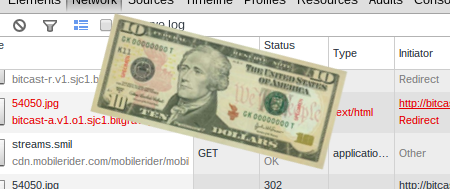
    <content type="html"><![CDATA[<p><img class="center" src="http://www.pnd4.net/images/2014-05-03-pay-per-stream-bypass/scrot-2014-05-03-ffdevtools.png"></p>

<p><em>After &#39;inspecting&#39; the source of a live webcast and the data that gets thrown around once the plugin is launched, I managed to get a 10$ webcast for free. To be honest, I feel like I just got lucky with this one.. While media is still woven into websites with embed tags as it was back when Geocities was booming, where besides the scrolling marquee we all insisted on looping our favorite song in the background, but this time theres all sorts of new protocols, plugins, and codecs at work. We can&#39;t just &#39;view-source&#39; and expect to see 10-dollars-worth-of.mp4. There&#39;s nothing to worry about though, we only have to dig a little harder. Probably real hard if you&#39;re like me and have never had much experience with media plugins.. So lets get to it.</em></p>

<p>First, you&#39;re going to want to check out the source of the page where the plugin and stream play. Your browser&#39;s developer tools come in real handy and should have everything you need for sleuthing around.</p>

<p>Right now we just need to take note of the <code>vendorID</code> and <code>mediaID</code> parameters. Both were mentioned at least a few times thoughout the page I was working with.</p>

<p>Next we want to examine the SMIL file which will tell us exactly where we can find our stream. I found mine by using Firefox&#39;s network console and paying attention to the back-and-forth dialog going on between the browser&#39;s plugin and the webcast host. I suspect if you did the same you&#39;d come up with similar, so here&#39;s mine to save you the trouble.</p>

<figure class='code'><div class="highlight"><table><tr><td class="gutter"><pre class="line-numbers"><span class='line-number'>1</span>
</pre></td><td class='code'><pre><code class=''><span class='line'>curl hxxp:||cdn.m0b1ler1der.c0m/m0b1ler1der/mobilestorefront/&lt;vendorID&gt;/media/file/&lt;mediaID&gt;/streams.smil</span></code></pre></td></tr></table></div></figure>

<p>In the output of the previous command here should be a couple key-value pairs like <code>content=&quot;http://yadayada.yup&quot;</code> and <code>src=&quot;/theStreamsUWereLookinFor@rightHurr&quot;</code> to help you put together a URI to pass to your chosen media player. </p>

<p>This URI is direct access to the stream, but if it returns an error or otherwise you&#39;re going to need to invesigate further. My hope is that I&#39;ve at least set you on the right foot toward success. As a final clue, here&#39;s what my result would&#39;ve looked like using the example values I&#39;ve used thus far.</p>

<figure class='code'><div class="highlight"><table><tr><td class="gutter"><pre class="line-numbers"><span class='line-number'>1</span>
</pre></td><td class='code'><pre><code class=''><span class='line'>http://yadayada.yup/i/theStreamsUWereLookinFor@rightHurr/master.m3u8</span></code></pre></td></tr></table></div></figure>

<p>If you&#39;re wondering the origin of the parts of the URI not supplied explicitly in the SMIL, they were taken from a previous URI from the same site, before they started asking for money.</p>
]]></content>
  </entry>
  
  <entry>
    <title type="html"><![CDATA[Optimizing a Pogoplug]]></title>
    <link href="http://www.pnd4.net/blog/2014/04/20/optimizing-a-pogoplug/"/>
    <updated>2014-04-20T04:46:00-07:00</updated>
    <id>http://www.pnd4.net/blog/2014/04/20/optimizing-a-pogoplug</id>
    <content type="html"><![CDATA[<ul>
<li>Here&#39;s a few tips on how to maximize your performance when using an embedded device like Pogoplug, RaspberryPi, etc. *</li>
</ul>

<h4>Flash-Drive I/O</h4>

<p>Flash memory is cheap and small. Most even have enough storage space that you can house your <code>ROOTFS</code> pretty comfortably. The downside is pretty sluggish reads/writes. Fortunately the pogoplug has 256MB&#39;s of RAM; By allocating some commonly written directories in RAM we gain speed plus the benefit of less write-cycles overall to our flash-memory. If you don&#39;t already know, flash memory has a limited number of writes, so this effectively prolongs the life of your drive/system.</p>

<p>Simply add/replace the appropriate lines to <code>fstab</code> ..</p>

<figure class='code'><div class="highlight"><table><tr><td class="gutter"><pre class="line-numbers"><span class='line-number'>1</span>
<span class='line-number'>2</span>
<span class='line-number'>3</span>
<span class='line-number'>4</span>
<span class='line-number'>5</span>
</pre></td><td class='code'><pre><code class=''><span class='line'>tmpfs /tmp         tmpfs nodev,nosuid,noatime           0 0
</span><span class='line'>tmpfs /var/tmp     tmpfs nodev,nosuid,noatime           0 0
</span><span class='line'>tmpfs /var/log     tmpfs nodev,nosuid,noatime,size=20M  0 0
</span><span class='line'>tmpfs /var/run     tmpfs defaults,noatime,size=1M       0 0
</span><span class='line'>tmpfs /var/lock    tmpfs defaults,noatime,size=1M       0 0</span></code></pre></td></tr></table></div></figure>

<h4>I/O Governor</h4>

<p>The logic that is behind your drive/disk access can be tweaked reducing lag by appending the following line to <code>/etc/rc.local</code> </p>

<figure class='code'><div class="highlight"><table><tr><td class="gutter"><pre class="line-numbers"><span class='line-number'>1</span>
</pre></td><td class='code'><pre><code class=''><span class='line'>echo deadline &gt; /sys/block/sda/queue/scheduler</span></code></pre></td></tr></table></div></figure>

<p>Note That I don’t use the <code>noop</code> scheduler because <code>deadline</code> can be better as it group small accesses, which improve latency. The default, <code>cfq</code> is better suited for disk-drives.</p>
]]></content>
  </entry>
  
  <entry>
    <title type="html"><![CDATA[Dual-Monitor Toggle]]></title>
    <link href="http://www.pnd4.net/blog/2014/04/03/dual-monitor-toggle/"/>
    <updated>2014-04-03T02:07:00-07:00</updated>
    <id>http://www.pnd4.net/blog/2014/04/03/dual-monitor-toggle</id>
    <content type="html"><![CDATA[<p><em>Recently I found myself in need of a way to switch X into single-monitor mode without having to kill the running instance of X, which is fine if you don&#39;t have any unsaved work, since it crashes all programs running within X as well.</em></p>

<h2>xrandr</h2>

<p>Using <code>xrandr</code>[^1] we are able to dynamically modify our desktop&#39;s properties.</p>

<p><strong>OFF</strong></p>

<figure class='code'><div class="highlight"><table><tr><td class="gutter"><pre class="line-numbers"><span class='line-number'>1</span>
</pre></td><td class='code'><pre><code class=''><span class='line'>xrandr --output DVI-0 --off</span></code></pre></td></tr></table></div></figure>

<p><strong>ON</strong></p>

<figure class='code'><div class="highlight"><table><tr><td class="gutter"><pre class="line-numbers"><span class='line-number'>1</span>
</pre></td><td class='code'><pre><code class=''><span class='line'>xrandr --output DVI-0 --left-of VGA-0 --auto</span></code></pre></td></tr></table></div></figure>

<p>[^1]: <a href="http://www.x.org/archive/X11R7.5/doc/man/man1/xrandr.1.html">Xrandr&#39;s Man Page</a></p>
]]></content>
  </entry>
  
  <entry>
    <title type="html"><![CDATA[CLI RTMP Streaming]]></title>
    <link href="http://www.pnd4.net/blog/2013/11/23/rtmpdump/"/>
    <updated>2013-11-23T00:00:00-08:00</updated>
    <id>http://www.pnd4.net/blog/2013/11/23/rtmpdump</id>
    <content type="html"><![CDATA[<p>As of 2013, some streams require the &#39;ksv&#39;/&#39;k-s-v&#39; patch.. Arch users can use <strong>rtmpdump-ksv</strong> instead of <strong>rtmpdump</strong></p>

<h3>Commands</h3>

<p>Redirect rtmp port using iptables.</p>
<div class="highlight"><pre><code class="language-text" data-lang="text">sudo iptables -t nat -A OUTPUT -p tcp --dport 1935 -j REDIRECT
</code></pre></div>
<p>Sniffing for stream parameters.</p>
<div class="highlight"><pre><code class="language-text" data-lang="text">rtmpsrv
</code></pre></div>
<p>Once you&#39;ve captured a stream, you can undo the redirection.</p>
<div class="highlight"><pre><code class="language-text" data-lang="text">sudo iptables -t nat -D OUTPUT -p tcp --dport 1935 -j REDIRECT
</code></pre></div>
<p>Use rtmpdump like so, piping the output to mplayer/vlc</p>
<div class="highlight"><pre><code class="language-text" data-lang="text">rtmpdump -q -r &quot;rtmpe://origin.hdcast.org:1935/redirect/&quot; -a &quot;redirect/&quot; -f &quot;LNX 11,9,900,152&quot; -W &quot;http://www.udemy.com/static/flash/player5.9.swf&quot; -p &quot;http://www.hdcast.org/embedlive2.php?u=ban5&amp;vw=640&amp;vh=460&amp;domain=www.btsportshd.com&quot; -y &quot;ban5&quot; -b &quot;10000&quot; -v | mplayer -really-quiet -framedrop -
</code></pre></div>
<h4>Important options</h4>

<p>rtmpdump</p>

<ul>
<li>-r [tcURL ex. &quot;rtmp://stream.url/&quot;]</li>
<li>-a [app ex. &quot;redirect/&quot;</li>
<li>-y [playpath ex. &quot;freetv4&quot;]</li>
<li>-v [live]</li>
<li>-b [buffersize ex. &quot;10000&quot;]</li>
<li>-W [swfURL ex. &quot;http://stream.url/flash/player5.9.swf&quot;]</li>
</ul>

<p>mplayer</p>

<ul>
<li>-really-quiet [Suppresses output.]</li>
<li>-framedrop [Helps with streams.]</li>
<li>- [Plays from stdout.]</li>
</ul>

<h4>Port redirect helper script</h4>

<p>I wrote a bash script that takes the hard part, remembering, out of the <strong>iptables</strong> step.</p>

<div class="highlight"><pre><code class="language-bash" data-lang="bash"><span class="c">#!/bin/bash</span>

<span class="c">## PND4</span>
<span class="c">## o1.27.13</span>

success<span class="o">()</span> <span class="o">{</span>
  <span class="nb">echo</span> <span class="s2">&quot;.. success :)&quot;</span>
<span class="o">}</span>

failure<span class="o">()</span> <span class="o">{</span>
  <span class="nb">echo</span> <span class="s2">&quot;-- FAILURE :(&quot;</span>
<span class="o">}</span>

add-rule<span class="o">()</span> <span class="o">{</span>
  sudo iptables -t nat -A OUTPUT -p tcp --dport <span class="m">1935</span> -j REDIRECT
<span class="o">}</span>

del-rule<span class="o">()</span> <span class="o">{</span>
  sudo iptables -t nat -D OUTPUT -p tcp --dport <span class="m">1935</span> -j REDIRECT
<span class="o">}</span>

<span class="k">case</span> <span class="s2">&quot;$1&quot;</span> in
  start<span class="o">)</span>
    <span class="nb">echo</span> <span class="s2">&quot;Starting..&quot;</span>
    <span class="c"># also delete rule if it exists for some reason to avoid dupes.</span>
    <span class="c"># always errors out so we ignore it</span>
    del-rule 2&gt;/dev/null
    add-rule
    <span class="o">[</span> <span class="nv">$?</span> -eq <span class="m">0</span> <span class="o">]</span> <span class="o">&amp;&amp;</span> success <span class="o">||</span> failure
    <span class="p">;;</span>
  stop<span class="o">)</span>
    <span class="nb">echo</span> <span class="s2">&quot;Stopping..&quot;</span>
    del-rule
    <span class="o">[</span> <span class="nv">$?</span> -eq <span class="m">0</span> <span class="o">]</span> <span class="o">&amp;&amp;</span> success <span class="o">||</span> failure
    <span class="p">;;</span>
  *<span class="o">)</span>
    <span class="nb">echo</span> <span class="s2">&quot;Usage: $0 &lt;start|stop&gt;&quot;</span>
    <span class="p">;;</span>
<span class="k">esac</span></code></pre></div>

<h4>Useful Links and References</h4>

<ol>
<li><a href="http://stream-recorder.com/forum/tutorial-simply-use-rtmpsrv-and-example-t6325.html?p=18142">rtmpsrv tutorial</a></li>
<li><a href="http://trac.xbmc.org/ticket/14089">XBMC: hint on buffer option</a></li>
</ol>
]]></content>
  </entry>
  
  <entry>
    <title type="html"><![CDATA[Motion Webcam]]></title>
    <link href="http://www.pnd4.net/blog/2013/11/11/motion-webcam/"/>
    <updated>2013-11-11T00:00:00-08:00</updated>
    <id>http://www.pnd4.net/blog/2013/11/11/motion-webcam</id>
    <content type="html"><![CDATA[<h3>Webcam Prices</h3>

<p>[as of 11.11.2013]</p>

<ul>
<li>20-23 HD-3000</li>
<li>15-20 Rocketfish 720p RF-HDWEB</li>
<li>17 M$ HD-2300</li>
</ul>

<h3><a href="http://forum.micasaverde.com/index.php?topic=9104.15">RasPi Notes</a></h3>

<p>RasPi community has good info on the subject. Should be valid for Pogoplugs too.</p>

<blockquote>
<p>A few recommendations I have for streaming USB webcams with linux:</p>

<ol>
<li><p>Unless you need the capabilities of motion (that is, you are using the motion detection built in to motion) use mjpg<em>streamer instead of motion. Motion processes each image to see if pixels have changed, and by default runs a lot of binary morphology on the images (erode, dilate, etc), where mjpg</em>streamer just streams. On my Pogoplus with four cameras this means the difference between 60%+ cpu utilization versus single digits (and to get down to 60% I had to drop the framerate to 2Hz and go through a bunch of options to turn off as much processing as possible). I have another machine running zoneminder which processes my streams which is why I don&#39;t mind forgoing motion detection.</p></li>
<li><p>Use MJPEG instead of YUV
If you want multiple webcams on a single USB bus this is basically a necessity. Even if you don&#39;t it means a lot less data to process. This is the default in mjpg<em>streamer, in motion set: &quot;v4l2</em>palette 2&quot; in motion.conf</p></li>
<li><p>Get a webcam with known support
Some webcams have a problem where the request a lot more bandwidth than they need and this means you can&#39;t use two at the same time. There is a hack to get around this in YUV mode, but not MJPEG which isn&#39;t much of a help. If you are up for hacking the driver yourself it should be possible to skip the BW check and make these work anyway, but that is quite a bit of work.</p></li>
</ol>

<p>Cameras that work simultaneously (no bandwidth bug):
-Logitech C120
-Logitech C160
-Logitech B500
-Logitech Quickcam E 3500
-Logitech Quickcam Messenger
-Microsoft HD-3000
-Microsoft HD-5000
-Rocketfish HD Webcam Pro</p>

<p>Cameras that do not work in multiples (bandwidth bug?):
-Logitech C110
-Logitech C310
-Creative Live! Cam Video IM Ultra
-HP 2-Megapixel Webcam (RZ406AA)</p>

<p>My current recommendation is probably the HD-3000. It is 720p and can be found for about $20. It does NOT have autofocus which I think is good for a webcam you leave running 24/7. I tried the HD-5000 and it spends a lot of time refocusing. I&#39;m afraid it would break after a few weeks. The C160 is currently the cheapest, about $8 shipped on ebay. Meritline sometimes sells it for $6. The irritating thing about the c120/c160 is that they have a focusing ring you have to adjust. For a security camera I would prefer fixed focus. I buy any webcam I can get at a firesale so I&#39;ll keep trying more - I would appreciate results from anyone else as well.</p>

<p>EDIT: Added a few more cameras]</p>

<p>It turns out you can disable autofocus on UVC supported webcams like this:</p>

<p>v4l2-ctl &#8211;verbose &#8211;set-ctrl=focus_auto=0</p>

<p>At least it works for me on all the AF cameras I have to test (Microsoft &amp; Rocketfish).</p>

<p>Not only is this a good idea for camera longevity (I would think so at least) it helps prevents false motion alarms.</p>
</blockquote>

<h4>Useful Links and References</h4>

<ol>
<li><a href="http://elinux.org/RPi_USB_Webcams">eLinux: RasPi Webcam compatibility list</a></li>
</ol>
]]></content>
  </entry>
  
  <entry>
    <title type="html"><![CDATA[Gentoo - Genkernel Upgrade Steps]]></title>
    <link href="http://www.pnd4.net/blog/2013/11/09/gentoo-genkernel-upgrade/"/>
    <updated>2013-11-09T00:00:00-08:00</updated>
    <id>http://www.pnd4.net/blog/2013/11/09/gentoo-genkernel-upgrade</id>
    <content type="html"><![CDATA[<p><em>I use genkernel to install my kernel.. this isn&#39;t the best way to do things but for now it gets the job done. Gentoo isn&#39;t my primary distro so I sometimes forget the steps to go through when they push a new kernel.</em></p>

<p>Make sure Gentoo is matched up with your target kernel version</p>

<figure class='code'><div class="highlight"><table><tr><td class="gutter"><pre class="line-numbers"><span class='line-number'>1</span>
<span class='line-number'>2</span>
</pre></td><td class='code'><pre><code class=''><span class='line'>eselect kernel list
</span><span class='line'>eselect kernel set #</span></code></pre></td></tr></table></div></figure>

<p>Build it</p>

<figure class='code'><div class="highlight"><table><tr><td class="gutter"><pre class="line-numbers"><span class='line-number'>1</span>
<span class='line-number'>2</span>
<span class='line-number'>3</span>
<span class='line-number'>4</span>
<span class='line-number'>5</span>
<span class='line-number'>6</span>
<span class='line-number'>7</span>
</pre></td><td class='code'><pre><code class=''><span class='line'>zcat /proc/config.gz &gt; /usr/src/linux
</span><span class='line'>cd /usr/src/linux
</span><span class='line'>make oldconfig
</span><span class='line'>make modules_prepare
</span><span class='line'>emerge --ask @module-rebuild
</span><span class='line'>make
</span><span class='line'>make modules_install</span></code></pre></td></tr></table></div></figure>

<p>Install it</p>

<figure class='code'><div class="highlight"><table><tr><td class="gutter"><pre class="line-numbers"><span class='line-number'>1</span>
</pre></td><td class='code'><pre><code class=''><span class='line'>genkernel --no-menuconfig --no-clean --install all</span></code></pre></td></tr></table></div></figure>

<p>Update bootloader</p>

<figure class='code'><div class="highlight"><table><tr><td class="gutter"><pre class="line-numbers"><span class='line-number'>1</span>
</pre></td><td class='code'><pre><code class=''><span class='line'>vim /boot/extlinux/extlinux.conf</span></code></pre></td></tr></table></div></figure>

<p>Reboot and cross your fingers.</p>

<p>Clean-up/delete old files in <code>/boot</code> and corresponding bootloader entries.</p>

<h4>Useful Links and References</h4>

<ol>
<li><a href="https://wiki.gentoo.org/wiki/Kernel/Upgrade" title="Kernel/Upgrade">Gentoo Wiki: Kernel/Upgrade</a></li>
</ol>
]]></content>
  </entry>
  
  <entry>
    <title type="html"><![CDATA[IPTables + Transmission + VPN]]></title>
    <link href="http://www.pnd4.net/blog/2013/11/04/iptables-transmission-vpn/"/>
    <updated>2013-11-04T00:00:00-08:00</updated>
    <id>http://www.pnd4.net/blog/2013/11/04/iptables-transmission-vpn</id>
    <content type="html"><![CDATA[<p>Transmission doesn&#39;t have a way to bind to specific interfaces without patching, and I like the simplicity of using a package manager like &#39;pacman&#39; vs patching &#39;BindInterface&#39; into Transmission and building it from source. The work-around, since Transmission can bind to an IP, is to run a script with cron periodically. 
The script should basically:</p>

<ul>
<li>first make sure the VPN is up and operational</li>
<li>correct transmission&#39;s config if the address isn&#39;t current.. [stop, edit, start]</li>
<li>definitely end with transmission running</li>
</ul>

<h3>Quote</h3>

<blockquote>
<p>Enforcing an application, for example a torrent client like Transmission, to always use the VPN interface or any particular network interface for that matter, is trivially simple using iptables on Debian, Ubuntu or any other GNU/Linux distro.
Personally, I am running Debian Sid on the Raspberry Pi. Occasionally I use it for downloading files ( legal stuff, seriously, believe me :D  ) using Transmission Bittorrent client over a VPN connection. Sometimes it happens that the VPN connection fails and doesn&#39;t reconnect for whatever reason and Transmission continues pulling stuff directly over my internet connection, which I would like to avoid. Fortunately it is very straightforward to enforce rules based on application owner UID. Transmission runs under the owner debian-transmission in Debian (use htop to check this) and the following two lines of iptables ensures that any process with owner having UID, debian-transmission, will not use any other network interface apart from the OpenVPN tunnel interface tun0</p>
</blockquote>
<div class="highlight"><pre><code class="language-text" data-lang="text">iptables -A OUTPUT -m owner --uid-owner debian-transmission -d 192.168.0.100 -j ACCEPT
iptables -A OUTPUT -m owner --uid-owner debian-transmission \! -o tun0 -j REJECT
</code></pre></div>
<blockquote>
<p>The first line ensures that, my Mac-mini having IP address 192.168.0.100 on the lan, can always access the web interface of transmission. The second line makes sure, no outgoing traffic can leave via anything other that tun0. 
Peace of mind restored, thanks to iptables.</p>
</blockquote>

<h3>Code</h3>

<p>transmission-vpn-only.sh</p>

<p><em>Ver. ArchLinuxARM-110413</em></p>

<div class="highlight"><pre><code class="language-bash" data-lang="bash"><span class="c">#!/bin/sh</span>

<span class="nv">iface</span><span class="o">=</span><span class="s2">&quot;tun0&quot;</span>
<span class="nv">service</span><span class="o">=</span><span class="s2">&quot;transmission.service&quot;</span>
<span class="nv">config</span><span class="o">=</span><span class="s2">&quot;/var/lib/transmission/.config/transmission-daemon/settings.json&quot;</span>

<span class="c"># test if service is currently running</span>
systemctl --quiet is-active <span class="nv">$service</span>
<span class="k">if</span> <span class="o">[</span> <span class="nv">$?</span> -eq <span class="m">0</span> <span class="o">]</span><span class="p">;</span> <span class="k">then</span>
    <span class="c"># get the ip from the current config</span>
    <span class="nv">savedIP</span><span class="o">=</span><span class="k">$(</span>cat <span class="nv">$config</span> <span class="p">|</span> egrep -o <span class="s1">&#39;\&quot;bind-address-ipv4\&quot;: \&quot;[^ ]*&#39;</span> <span class="p">|</span> cut -d<span class="s1">&#39;&quot;&#39;</span> -f4<span class="k">)</span>
    <span class="c"># test if ip has changed and is no longer available</span>
    ping -i1 -w2 -c1 <span class="nv">$savedIP</span> &gt;/dev/null
    <span class="k">if</span> <span class="o">[[</span> <span class="nv">$?</span> -ne <span class="m">0</span> <span class="o">||</span> <span class="s2">&quot;x$savedIP&quot;</span> <span class="o">==</span> <span class="s2">&quot;x0.0.0.0&quot;</span> <span class="o">]]</span><span class="p">;</span> <span class="k">then</span>
        <span class="nb">echo </span>IP unavailable, stop and reconfigure transmission..
        systemctl stop <span class="nv">$service</span>
        <span class="c"># test if VPN went down completely</span>
        ifconfig <span class="nv">$iface</span> &gt;/dev/null
        <span class="k">if</span> <span class="o">[</span> <span class="nv">$?</span> -ne <span class="m">0</span> <span class="o">]</span><span class="p">;</span> <span class="k">then</span>
            <span class="nb">echo </span>Oops.. <span class="nv">$iface</span> not available, exiting without restarting transmission..
            <span class="nb">exit </span>1
        <span class="k">fi</span>
        <span class="c"># reconfigure transmission with new ip address</span>
        sed -i <span class="s2">&quot;s/\&quot;bind-address-ipv4\&quot;:.*\$/\&quot;bind-address-ipv4\&quot;: \&quot;$(ip a show dev $iface | egrep -o &#39;inet [^ ]* &#39; | cut -d&#39; &#39; -f2 | sed &#39;s/ //&#39;)\&quot;,/&quot;</span> <span class="nv">$config</span>
        systemctl start <span class="nv">$service</span>
        <span class="nb">echo </span>Transmission started.
    <span class="k">fi</span>
<span class="k">else</span>
    <span class="nb">echo</span> <span class="s2">&quot;Transmission isn&#39;t running..&quot;</span>
    <span class="nb">exit </span>1
<span class="k">fi</span></code></pre></div>

<h3>To-Do</h3>

<ul>
<li>Figure out how to &#39;BindInterface&#39;, if possible.</li>
<li>Revise transmission-vpn-only script.</li>
<li>Figure out why openvpn config leaves routes behind.</li>
</ul>

<h4>Useful Links and References</h4>

<ol>
<li><a href="http://www.botcyb.org/2012/11/force-application-to-use-vpn-using.html" title="BotCyborg">BotCyborg</a></li>
</ol>
]]></content>
  </entry>
  
  <entry>
    <title type="html"><![CDATA[Solidworks Rig]]></title>
    <link href="http://www.pnd4.net/blog/2013/10/21/solidworks-build/"/>
    <updated>2013-10-21T00:00:00-07:00</updated>
    <id>http://www.pnd4.net/blog/2013/10/21/solidworks-build</id>
    <content type="html"><![CDATA[<h4>Min Reqs (Win7x64)</h4>
<div class="highlight"><pre><code class="language-text" data-lang="text">CPU     Intel or AMD with SSE2 support. 64-bit OS recommended.
RAM     2GB+
HDD     5GB+
Video   Quadro/QuadroFX/FireGL/FirePro
</code></pre></div>
<h2>Notes regarding HW selection</h2>

<ul>
<li><a href="http://www.newegg.com/Product/Product.aspx?Item=N82E16814195112">FirePro v3900</a> was best bang for buck. Good Solidworks reviews.</li>
<li>4GB of RAM will work, can always upgrade.</li>
<li>3.5Ghz Dual core + Hyper-Threading (<a href="http://www.newegg.com/Product/Product.aspx?Item=N82E16819116775">i3-3220</a>/3240) should be plenty.</li>
</ul>

<p><a href="http://www.capinc.com/support/tips/solidworks-tech-tips-hardware">Capinc Solidworks HW Tips</a></p>

<ul>
<li>Video Card: VERY important</li>
<li>Proc: Solidworks is optimized for multiple cores</li>
<li>RAM:
Solidworks grabs 340mb on launch.
4gb+ is only necessary for very large assemblies (over 10,000 parts)</li>
<li>HD: Generally, does not affect Solidworks performance</li>
</ul>

<h2>Newegg specials for Oct.</h2>

<p><strong>&quot;i5&quot; Combo + FirePro V3900 <a href="until%2010/25"> ~$630 </a></strong></p>

<p>Someone mentioned i5 &amp; i7&#39;s have decent enough graphics to run Solidworks.. maybe just get FirePro later, if needed?  </p>

<ul>
<li>Trustworthy PSU</li>
<li>i5 is Quad Core, 8MB-L2, HD4000 &#39;integrated&#39; gfx</li>
<li>8GB RAM</li>
<li>1TB HDD, SSD would&#39;ve been nicer.</li>
<li>USB 3.0</li>
<li><p>No case.</p>

<p><a href="http://www.newegg.com/Product/ComboBundleDetails.aspx?ItemList=Combo.1291151">Combo: 1291151</a></p></li>
</ul>

<p><strong>&quot;i3&quot; Combo + FirePro V3900 <a href="until%2010/31"> ~$ 430 </a></strong></p>

<ul>
<li>Decent PSU. But low wattage.</li>
<li>500GB HDD</li>
<li>USB 3.0</li>
<li><p>Plain Case.</p>

<p><a href="http://www.newegg.com/Product/ComboBundleDetails.aspx?ItemList=Combo.1271103">Combo: 1271103</a></p></li>
</ul>

<p><strong>&quot;Budget Gaming&quot; Combo <a href="until%2010/31"> $ 370 </a></strong></p>

<ul>
<li>nVidia GT 640 2GB, instead of FirePro ?<br>
.. donno if that&#39;s such a good idea.</li>
<li>Good PSU</li>
<li>500GB HDD</li>
<li>USB 3.0</li>
<li><p>Decent looking case.</p>

<p><a href="http://www.newegg.com/Product/ComboBundleDetails.aspx?ItemList=Combo.1461943">Combo: 1461943</a></p></li>
</ul>
]]></content>
  </entry>
  
  <entry>
    <title type="html"><![CDATA[Hostapd]]></title>
    <link href="http://www.pnd4.net/blog/2013/10/18/hostapd/"/>
    <updated>2013-10-18T00:00:00-07:00</updated>
    <id>http://www.pnd4.net/blog/2013/10/18/hostapd</id>
    <content type="html"><![CDATA[<p>Wireless access point daemon</p>

<p><strong>Karma</strong> a version of hostapd for creating <em>rogue</em> access points.</p>

<h3>NAT or Bridge</h3>

<p>IP&#39;s must be handed out to the connecting clients so one or the other must be configured</p>

<ul>
<li>NAT - creates a new subnet &quot;.. with IP forwarding/masquerading and DHCP service (wireless clients will use a dedicated subnet, data from/to that subnet is NAT-ted &#8211; similar to a normal WiFi router that&#39;s connected to your DSL or cable modem)&quot; &#8211; Archwiki
&gt; see the <a href="http://www.pnd4.net/blog/2013/10/16/firewall">Firewalls</a> article</li>
<li>Bridge - &quot;.. Simple, but it requires that any service that&#39;s needed by your wireless clients (like, DHCP) is available on your computers external interface. That means it will not work if you have a dialup connection (e.g., via PPPoE or a 3G modem) or if you&#39;re using a cable modem that will supply exactly one IP address to you via DHCP.&quot; &#8211;ArchWiki
&gt; You need to create a network bridge and add your network interface (e.g. eth0) to it. You should not add the wireless device (e.g. wlan0) to the bridge; hostapd will add it on its own.
&gt;
&gt;If you use netctl, see Bridge with netctl for details (just do not add tap0 used in that example). </li>
</ul>

<h3>Configuration</h3>

<p>System configuration is stored in /etc/hostapd/hostapd.conf.</p>

<p>To override at runtime:
    sudo hostapd /path/to/hostapd.conf</p>

<p>General use, non-Karma, WPA/WPA2 config<br>
From <a href="https://nims11.wordpress.com/2012/04/27/hostapd-the-linux-way-to-create-virtual-wifi-access-point/">nims.wordpress.com</a>
<figure class='code'><div class="highlight"><table><tr><td class="gutter"><pre class="line-numbers"><span class='line-number'>1</span>
<span class='line-number'>2</span>
<span class='line-number'>3</span>
<span class='line-number'>4</span>
<span class='line-number'>5</span>
<span class='line-number'>6</span>
<span class='line-number'>7</span>
<span class='line-number'>8</span>
<span class='line-number'>9</span>
<span class='line-number'>10</span>
<span class='line-number'>11</span>
<span class='line-number'>12</span>
<span class='line-number'>13</span>
<span class='line-number'>14</span>
<span class='line-number'>15</span>
<span class='line-number'>16</span>
<span class='line-number'>17</span>
<span class='line-number'>18</span>
<span class='line-number'>19</span>
<span class='line-number'>20</span>
<span class='line-number'>21</span>
<span class='line-number'>22</span>
<span class='line-number'>23</span>
<span class='line-number'>24</span>
<span class='line-number'>25</span>
<span class='line-number'>26</span>
<span class='line-number'>27</span>
<span class='line-number'>28</span>
<span class='line-number'>29</span>
<span class='line-number'>30</span>
<span class='line-number'>31</span>
<span class='line-number'>32</span>
<span class='line-number'>33</span>
<span class='line-number'>34</span>
<span class='line-number'>35</span>
<span class='line-number'>36</span>
<span class='line-number'>37</span>
<span class='line-number'>38</span>
<span class='line-number'>39</span>
<span class='line-number'>40</span>
<span class='line-number'>41</span>
<span class='line-number'>42</span>
<span class='line-number'>43</span>
<span class='line-number'>44</span>
</pre></td><td class='code'><pre><code class=''><span class='line'>#sets the wifi interface to use, is wlan0 in most cases
</span><span class='line'>interface=wlan0
</span><span class='line'>#driver to use, nl80211 works in most cases
</span><span class='line'>driver=nl80211
</span><span class='line'>#sets the ssid of the virtual wifi access point
</span><span class='line'>ssid=dontMessWithVincentValentine
</span><span class='line'>#sets the mode of wifi, depends upon the devices you will be using. It can be a,b,g,n. Setting to g ensures backward compatiblity.
</span><span class='line'>hw<em>mode=g
</span><span class='line'>#sets the channel for your wifi
</span><span class='line'>channel=6
</span><span class='line'>#macaddr</em>acl sets options for mac address filtering. 0 means &quot;accept unless in deny list&quot;
</span><span class='line'>macaddr<em>acl=0
</span><span class='line'>#setting ignore</em>broadcast<em>ssid to 1 will disable the broadcasting of ssid
</span><span class='line'>ignore</em>broadcast<em>ssid=0
</span><span class='line'>#Sets authentication algorithm
</span><span class='line'>#1 - only open system authentication
</span><span class='line'>#2 - both open system authentication and shared key authentication
</span><span class='line'>auth</em>algs=1
</span><span class='line'> 
</span><span class='line'>#####Sets WPA and WPA2 authentication#####
</span><span class='line'>#wpa option sets which wpa implementation to use
</span><span class='line'>#1 - wpa only
</span><span class='line'>#2 - wpa2 only
</span><span class='line'>#3 - both
</span><span class='line'> wpa=3
</span><span class='line'>#sets wpa passphrase required by the clients to authenticate themselves on the network
</span><span class='line'> wpa<em>passphrase=KeePGuessinG
</span><span class='line'>#sets wpa key management
</span><span class='line'> wpa</em>key<em>mgmt=WPA-PSK
</span><span class='line'>#sets encryption used by WPA
</span><span class='line'> wpa</em>pairwise=TKIP
</span><span class='line'>#sets encryption used by WPA2
</span><span class='line'> rsn<em>pairwise=CCMP
</span><span class='line'><br>
</span><span class='line'>#################################
</span><span class='line'><br>
</span><span class='line'>#####Sets WEP authentication#####
</span><span class='line'>#WEP is not recommended as it can be easily broken into
</span><span class='line'>   wep</em>default<em>key=0
</span><span class='line'>   wep</em>key0=qwert    #5,13, or 16 characters
</span><span class='line'>#optionally you may also define wep<em>key2, wep</em>key3, and wep_key4
</span><span class='line'><br>
</span><span class='line'>#################################
</span><span class='line'>#For No encryption, you don&#39;t need to set any options</span></code></pre></td></tr></table></div></figure></p>

<p>non-Karma w/ WPA2
<figure class='code'><div class="highlight"><table><tr><td class="gutter"><pre class="line-numbers"><span class='line-number'>1</span>
<span class='line-number'>2</span>
<span class='line-number'>3</span>
<span class='line-number'>4</span>
<span class='line-number'>5</span>
<span class='line-number'>6</span>
<span class='line-number'>7</span>
<span class='line-number'>8</span>
<span class='line-number'>9</span>
<span class='line-number'>10</span>
<span class='line-number'>11</span>
<span class='line-number'>12</span>
</pre></td><td class='code'><pre><code class=''><span class='line'>interface=tpl0
</span><span class='line'>driver=nl80211
</span><span class='line'>ssid=2WIRE022
</span><span class='line'>hw<em>mode=g
</span><span class='line'>channel=10
</span><span class='line'>macaddr</em>acl=0
</span><span class='line'>auth<em>algs=1
</span><span class='line'>ignore</em>broadcast<em>ssid=0
</span><span class='line'>wpa=2
</span><span class='line'>wpa</em>passphrase=SecretPassword1234
</span><span class='line'>wpa<em>key</em>mgmt=WPA-PSK
</span><span class='line'>rsn_pairwise=CCMP</span></code></pre></td></tr></table></div></figure></p>

<p>Karma w/ WEP
<figure class='code'><div class="highlight"><table><tr><td class="gutter"><pre class="line-numbers"><span class='line-number'>1</span>
<span class='line-number'>2</span>
<span class='line-number'>3</span>
<span class='line-number'>4</span>
<span class='line-number'>5</span>
<span class='line-number'>6</span>
<span class='line-number'>7</span>
<span class='line-number'>8</span>
<span class='line-number'>9</span>
<span class='line-number'>10</span>
<span class='line-number'>11</span>
<span class='line-number'>12</span>
<span class='line-number'>13</span>
<span class='line-number'>14</span>
<span class='line-number'>15</span>
<span class='line-number'>16</span>
<span class='line-number'>17</span>
<span class='line-number'>18</span>
<span class='line-number'>19</span>
<span class='line-number'>20</span>
<span class='line-number'>21</span>
<span class='line-number'>22</span>
<span class='line-number'>23</span>
<span class='line-number'>24</span>
<span class='line-number'>25</span>
<span class='line-number'>26</span>
<span class='line-number'>27</span>
<span class='line-number'>28</span>
<span class='line-number'>29</span>
<span class='line-number'>30</span>
<span class='line-number'>31</span>
<span class='line-number'>32</span>
<span class='line-number'>33</span>
<span class='line-number'>34</span>
<span class='line-number'>35</span>
<span class='line-number'>36</span>
<span class='line-number'>37</span>
<span class='line-number'>38</span>
<span class='line-number'>39</span>
<span class='line-number'>40</span>
<span class='line-number'>41</span>
<span class='line-number'>42</span>
<span class='line-number'>43</span>
<span class='line-number'>44</span>
<span class='line-number'>45</span>
<span class='line-number'>46</span>
<span class='line-number'>47</span>
</pre></td><td class='code'><pre><code class=''><span class='line'># config file to use with the Karma&#39;d version of hostapd
</span><span class='line'># created by Robin Wood - robin@digininja.org - www.digininja.org
</span><span class='line'>
</span><span class='line'>interface=tpl0
</span><span class='line'>driver=nl80211
</span><span class='line'>country<em>code=US
</span><span class='line'>
</span><span class='line'>ssid=AndroidAP
</span><span class='line'>channel=3
</span><span class='line'>
</span><span class='line'>wep</em>default<em>key=0
</span><span class='line'>wep</em>key0=SecretPassword1234
</span><span class='line'>
</span><span class='line'># Both open and shared auth
</span><span class='line'>auth<em>algs=3
</span><span class='line'>
</span><span class='line'># no SSID cloaking
</span><span class='line'>ignore</em>broadcast<em>ssid=0
</span><span class='line'>
</span><span class='line'># -1 = log all messages
</span><span class='line'>logger</em>syslog=-1
</span><span class='line'>logger<em>stdout=-1
</span><span class='line'>
</span><span class='line'># 2 = informational messages
</span><span class='line'>logger</em>syslog<em>level=2
</span><span class='line'>logger</em>stdout<em>level=2
</span><span class='line'>
</span><span class='line'># Dump file for state information (on SIGUSR1)
</span><span class='line'># example: kill -USR1 &lt;pid&gt;
</span><span class='line'>dump</em>file=/tmp/hostapd.dump
</span><span class='line'>ctrl<em>interface=/var/run/hostapd
</span><span class='line'>ctrl</em>interface<em>group=adm
</span><span class='line'>
</span><span class='line'># 0 = accept unless in deny list
</span><span class='line'>macaddr</em>acl=0
</span><span class='line'>
</span><span class='line'># only used if you want to do filter by MAC address
</span><span class='line'>accept<em>mac</em>file=/etc/hostapd/hostapd.accept
</span><span class='line'>deny<em>mac</em>file=/etc/hostapd/hostapd.deny
</span><span class='line'>
</span><span class='line'># Finally, enable Karma
</span><span class='line'>enable<em>karma=0
</span><span class='line'>
</span><span class='line'># Black and white listing
</span><span class='line'># 0 = white
</span><span class='line'># 1 = black
</span><span class='line'>karma</em>black_white=1</span></code></pre></td></tr></table></div></figure></p>

<h5>Useful links and references</h5>

<p><a href="https://wiki.archlinux.org/index.php/Software_Access_Point">ArchWiki: Software Access Point</a></p>
]]></content>
  </entry>
  
  <entry>
    <title type="html"><![CDATA[Octopress]]></title>
    <link href="http://www.pnd4.net/blog/2013/10/17/octopress/"/>
    <updated>2013-10-17T00:00:00-07:00</updated>
    <id>http://www.pnd4.net/blog/2013/10/17/octopress</id>
    <content type="html"><![CDATA[<p>Markdown blogging platform built on Ruby.</p>

<h3>Installation</h3>

<p>First install ruby.
Then clone repo</p>
<div class="highlight"><pre><code class="language-text" data-lang="text">git clone git://github.com/imathis/octopress.git octopress
cd octopress
</code></pre></div>
<p>Install dependencies</p>
<div class="highlight"><pre><code class="language-text" data-lang="text">sudo gem install bundler
bundle install # make sure to run this one in the &#39;octopress&#39; directory
</code></pre></div>
<p>Install default theme</p>
<div class="highlight"><pre><code class="language-text" data-lang="text">rake install
</code></pre></div>
<h3>Useful Links and References</h3>

<p><a href="http://octopress.org" title="Octopress Official Site">Octopress.org</a></p>

<p><a href="http://jekyllrb.com/docs" title="Jekyll&#39;s Documentation">Jekyll Docs</a></p>

<p><a href="http://blog.bigdinosaur.org/changing-octopresss-header/" title="Calling all noobs">BigdinosaurBlog: Changing Octopress&#39; Header</a></p>
]]></content>
  </entry>
  
  <entry>
    <title type="html"><![CDATA[GIT Version Control System]]></title>
    <link href="http://www.pnd4.net/blog/2013/10/17/git/"/>
    <updated>2013-10-17T00:00:00-07:00</updated>
    <id>http://www.pnd4.net/blog/2013/10/17/git</id>
    <content type="html"><![CDATA[<h2>Starting a new repo</h2>

<p>create project directory</p>
<div class="highlight"><pre><code class="language-text" data-lang="text">mkdir -p &lt;folder&gt;
cd &lt;folder&gt;
</code></pre></div>
<p>create files or copy them from existing project.</p>
<div class="highlight"><pre><code class="language-text" data-lang="text">touch README.md
</code></pre></div>
<p>initialize barebone git files</p>
<div class="highlight"><pre><code class="language-text" data-lang="text">git init
</code></pre></div>
<p>prepare commit with annotations and files</p>
<div class="highlight"><pre><code class="language-text" data-lang="text">git add README.md
git commit -m &quot;&lt;message&gt;&quot;
</code></pre></div>
<p>new project, so create remote origin, and master branch</p>
<div class="highlight"><pre><code class="language-text" data-lang="text">git remote add origin &lt;url | git@github.com:pnd4/&lt;project&gt;.git&quot;
</code></pre></div>
<p>publish files to the new git-repository</p>
<div class="highlight"><pre><code class="language-text" data-lang="text">git push -u origin master
</code></pre></div>
<h2>Tips from the IRC guys</h2>

<p><em>Excerpt from: freenode<em>#crunchbang-offtopic</em>20130929.log</em>
<figure class='code'><div class="highlight"><table><tr><td class="gutter"><pre class="line-numbers"><span class='line-number'>1</span>
<span class='line-number'>2</span>
<span class='line-number'>3</span>
<span class='line-number'>4</span>
<span class='line-number'>5</span>
<span class='line-number'>6</span>
<span class='line-number'>7</span>
<span class='line-number'>8</span>
<span class='line-number'>9</span>
<span class='line-number'>10</span>
<span class='line-number'>11</span>
<span class='line-number'>12</span>
<span class='line-number'>13</span>
<span class='line-number'>14</span>
<span class='line-number'>15</span>
<span class='line-number'>16</span>
<span class='line-number'>17</span>
<span class='line-number'>18</span>
<span class='line-number'>19</span>
<span class='line-number'>20</span>
<span class='line-number'>21</span>
<span class='line-number'>22</span>
<span class='line-number'>23</span>
<span class='line-number'>24</span>
<span class='line-number'>25</span>
<span class='line-number'>26</span>
<span class='line-number'>27</span>
<span class='line-number'>28</span>
<span class='line-number'>29</span>
<span class='line-number'>30</span>
<span class='line-number'>31</span>
<span class='line-number'>32</span>
<span class='line-number'>33</span>
<span class='line-number'>34</span>
<span class='line-number'>35</span>
<span class='line-number'>36</span>
<span class='line-number'>37</span>
<span class='line-number'>38</span>
<span class='line-number'>39</span>
<span class='line-number'>40</span>
</pre></td><td class='code'><pre><code class=''><span class='line'>[00:04:25] &lt;Ferus&gt; also thats why you git pull
</span><span class='line'>[00:04:28] &lt;Ferus&gt; all the time
</span><span class='line'>[00:04:29] &lt;Ferus&gt; lel
</span><span class='line'>[00:04:33] &lt;orik&gt; xD
</span><span class='line'>[00:04:57] * Ferus passes pnd4 an american spirit black
</span><span class='line'>[00:04:59] &lt;pnd4&gt; hmm whats the diff between git pull and clone?
</span><span class='line'>[00:05:00] &lt;orik&gt; well phoronix even has good things to say about mpv
</span><span class='line'>[00:05:10] &lt;orik&gt; a pull just checks for changes and
</span><span class='line'>[00:05:19] &lt;Ferus&gt; clone clones a new repo, pull pulls the new changes from master
</span><span class='line'>[00:05:26] &lt;orik&gt; ^^
</span><span class='line'>[00:05:27] &lt;pnd4&gt; oh ok.. thanks
</span><span class='line'>[00:05:50] &lt;orik&gt; man I&#39;ve been using git at work for the past three months and I swear I still don&#39;t fully understand it
</span><span class='line'>[00:05:56] &lt;Ferus&gt; tl;dr if the repo doesnt exist locally, you clone from master, if it does exist locally, you pull from master
</span><span class='line'>[00:06:19] &lt;Ferus&gt; orik: i&#39;ve been using git for two years, i broke my repo 5 months ago and havent fixed it
</span><span class='line'>[00:06:34] &lt;Ferus&gt; (i dont know how ;_;)
</span><span class='line'>[00:07:41] &lt;pnd4&gt; ok so Ive cloned dwmstatus earlier, made changes. if I do a pull, does it undo my changes to match the current master?
</span><span class='line'>[00:07:52] *** Joins: salam4ik (~salam4ik@89.106.233.158)
</span><span class='line'>[00:08:10] * pnd4 copies directory and just tries it.. &#39;banzai!&#39;
</span><span class='line'>[00:08:21] &lt;Ferus&gt; no, it&#39;ll complain that you have un-stashed changed
</span><span class='line'>[00:08:23] &lt;Ferus&gt; changes*
</span><span class='line'>[00:08:39] &lt;Ferus&gt; so you want to do <code>git stash; git pull; git stash pop</code>
</span><span class='line'>[00:09:05] &lt;pnd4&gt; stash, thats a new one too.. did I mention I&#39;m quite new to git ? haha.
</span><span class='line'>[00:09:17] &lt;Ferus&gt; (this is all i know how to do)
</span><span class='line'>[00:09:27] &lt;Ferus&gt; besides add and rm, but thats kinda obvious
</span><span class='line'>[00:09:44] &lt;pnd4&gt; thanks. I&#39;ll try and remember that if/when suckless puts out a new version
</span><span class='line'>[00:10:49] &lt;pnd4&gt; I think having familiarity with git should help in the job search.. I mean, who wouldn&#39;t want a guy that&#39;s familiar with widely used version control systems?
</span><span class='line'>[00:10:49] &lt;Ferus&gt; you can always google it
</span><span class='line'>[00:11:46] &lt;pnd4&gt; that is true, but the tl;dr versions are always nice
</span><span class='line'>[00:12:52] &lt;pnd4&gt; Halts: ebay has the hat I want for 25 (down from 35$) .. they&#39;re out of my size.. I share your pain.
</span><span class='line'>[00:14:05] &lt;pnd4&gt; its like that scene in &#39;The Last Samurai&#39; where they cut his hair
</span><span class='line'>[00:15:40] &lt;Halts&gt; at least you can buy your hat.
</span><span class='line'>[00:16:01] &lt;pnd4&gt; would you buy your jersey still if it was 120 ?
</span><span class='line'>[00:16:59] &lt;Ferus&gt; &gt; IP Location: Kingston / New York / United States
</span><span class='line'>[00:17:08] &lt;Ferus&gt; bahaha this site is horrible, cant even geolocate
</span><span class='line'>[00:18:22] &lt;Halts&gt; haha, not right now.
</span><span class='line'>[00:18:28] &lt;Halts&gt; but I eventually would, yes.
</span><span class='line'>[00:18:40] &lt;Halts&gt; I&#39;d like to get it for
</span><span class='line'>[00:18:50] &lt;Halts&gt; but, a bunch of cunts ruined that
</span><span class='line'>[00:19:57] *** Quits: orik (~orik@50-46-134-47.evrt.wa.frontiernet.net) (Remote host closed the connection)
</span><span class='line'>[00:20:51] &lt;n2o4&gt; pnd4: Just checkout your features into it&#39;s own branch, for example git clone foobar, git checkout -b my-super-branch, make edits and commit, issue git checkout master to check into the master branch again.</span></code></pre></td></tr></table></div></figure></p>

<h2>Useful Links and References</h2>

<ol>
<li><a href="https://github.com">GitHub</a></li>
</ol>
]]></content>
  </entry>
  
  <entry>
    <title type="html"><![CDATA[Markdown Template]]></title>
    <link href="http://www.pnd4.net/blog/2013/10/16/template/"/>
    <updated>2013-10-16T00:00:00-07:00</updated>
    <id>http://www.pnd4.net/blog/2013/10/16/template</id>
    <content type="html"><![CDATA[<p>A template for markdown posts. Covers some frequently used syntax.</p>

<h2>Images</h2>

<figure class='code'><figcaption><span>Markdown </span></figcaption>
<div class="highlight"><table><tr><td class="gutter"><pre class="line-numbers"><span class='line-number'>1</span>
</pre></td><td class='code'><pre><code class=''><span class='line'>&lt;img class="center" src="http://www.pnd4.net/images/that-image.jpg"></span></code></pre></td></tr></table></div></figure>

<h2>Quote</h2>

<blockquote>
<p>More.<br>
Notes.</p>
</blockquote>

<h2>Code</h2>

<p>example.sh</p>

<div class="highlight"><pre><code class="language-bash" data-lang="bash"><span class="c">#!/bin/bash</span>
    <span class="nb">test </span><span class="m">1</span> -eq <span class="m">1</span> <span class="o">&amp;&amp;</span> <span class="nb">echo true</span> <span class="o">||</span> <span class="nb">echo false</span></code></pre></div>

<p>You can also insert <code>preformatted text</code> using backtick&#39;s.</p>

<p>Also see Octopress&#39;s Documentation[^1]</p>

<h2>List</h2>

<ul>
<li>item 1</li>
<li>item 2</li>
<li>item 3</li>
</ul>

<h2>References</h2>

<p>See Wordpress&#39;s Cheatsheet[^2] for more examples of Markdown.</p>

<h2>Useful Links</h2>

<p><a href="http://octopress.org">Octopress.Org</a></p>

<p>[^1]: <a href="http://octopress.org/docs/blogging/plugins/">Octopress Documentation</a>
[^2]: <a href="http://en.support.wordpress.com/markdown-quick-reference/">Wordpress Markdown Reference</a></p>
]]></content>
  </entry>
  
  <entry>
    <title type="html"><![CDATA[Ruby Installation]]></title>
    <link href="http://www.pnd4.net/blog/2013/10/16/ruby-install/"/>
    <updated>2013-10-16T00:00:00-07:00</updated>
    <id>http://www.pnd4.net/blog/2013/10/16/ruby-install</id>
    <content type="html"><![CDATA[<p>Ruby can be confusing to install. Make sure to plan out if per-user environments are going to be used, or system-wide (Ruby, Gems, etc installed by root).</p>

<h2>Installing</h2>

<p>Instead of using rvm or rbenv, stick to installing Ruby system-wide with pacman.</p>

<figure class='code'><div class="highlight"><table><tr><td class="gutter"><pre class="line-numbers"><span class='line-number'>1</span>
</pre></td><td class='code'><pre><code class=''><span class='line'>pacman -S ruby</span></code></pre></td></tr></table></div></figure>

<h2>Paths</h2>

<p>Caution editing your .bashrc or .zshrc.. root does not need to have a GEM_HOME or ~/.gem/ruby/2.0.0 added to its PATH</p>

<h4>~/.gemrc</h4>

<p>For root, create .gemrc so that when gems are installed as root, it uses the system-wide directory.</p>

<figure class='code'><div class="highlight"><table><tr><td class="gutter"><pre class="line-numbers"><span class='line-number'>1</span>
</pre></td><td class='code'><pre><code class=''><span class='line'>gem: --no-user-install</span></code></pre></td></tr></table></div></figure>

<p>Optionally, create user&#39;s .gemrc as well, although it&#39;d be the same as in /etc/gemrc, which is automatically made by the ArchPkg</p>

<figure class='code'><div class="highlight"><table><tr><td class="gutter"><pre class="line-numbers"><span class='line-number'>1</span>
</pre></td><td class='code'><pre><code class=''><span class='line'>gem: --user-install</span></code></pre></td></tr></table></div></figure>

<h2>Updating Gems</h2>

<p>Update system:  sudo gem update &#8211;system
Update user:  gem update</p>

<h2>Useful Links and References</h2>

<p><a href="https://wiki.archlinux.org/index.php/Ruby">Archwiki: Ruby</a></p>

<p><a href="https://projects.archlinux.org/svntogit/packages.git/tree/trunk/ruby.install?h=packages/ruby">Note from ArchDev about .gemrc</a></p>
]]></content>
  </entry>
  
  <entry>
    <title type="html"><![CDATA[Wifi Pinapple Mark 5]]></title>
    <link href="http://www.pnd4.net/blog/2013/10/16/pinapple-v/"/>
    <updated>2013-10-16T00:00:00-07:00</updated>
    <id>http://www.pnd4.net/blog/2013/10/16/pinapple-v</id>
    <content type="html"><![CDATA[<p>Advanced standalone pentesting tool for wireless networks.</p>

<h3>Specs</h3>

<figure class='code'><div class="highlight"><table><tr><td class="gutter"><pre class="line-numbers"><span class='line-number'>1</span>
<span class='line-number'>2</span>
</pre></td><td class='code'><pre><code class=''><span class='line'>AR9331 and RTL8187
</span><span class='line'>16mb ROM / 64mb DDR2 RAM</span></code></pre></td></tr></table></div></figure>

<h3>Software</h3>

<blockquote>
<p>Available Pentest Packages include aircrack-ng, dsniff, easy-creds, ettercap, hping3, httptunnel, karma, kismet, macchanger, mdk3, ngrep, nmap, nodogsplash captive portal, privoxy, ptunnel, snort, sslsniff, sslstrip, ssltunnel, stunnel, tcpdump, tor, and reaver</p>
</blockquote>

<p>&#8211;HakShop</p>

<h3>Useful Links and References</h3>

<p><a href="http://hakshop.myshopify.com/collections/wifi-pineapple/products/wifi-pineapple" title="Wifi Pinapple Mark 5">HakShop: Wifi Pinapple Mark 5</a></p>

<p><a href="https://wifipineapple.com/index.php">wifipinapple.com</a></p>
]]></content>
  </entry>
  
  <entry>
    <title type="html"><![CDATA[Firewalls]]></title>
    <link href="http://www.pnd4.net/blog/2013/10/16/firewall/"/>
    <updated>2013-10-16T00:00:00-07:00</updated>
    <id>http://www.pnd4.net/blog/2013/10/16/firewall</id>
    <content type="html"><![CDATA[<p>Use <strong>iptables</strong> to secure netlink infrastructure.</p>

<h3>Where the rules files go</h3>

<p>In Arch, the usual /etc/iptables/iptables.rules
In Gentoo, the rules are restored from /var/lib/iptables/rules-save
In Debian, wiki says to create /etc/network/if-pre-up.d/iptables (chmod +x)</p>

<h3>Rules Basic Template</h3>

<p>Based on: https://wiki.archlinux.org/index.php/Simple<em>Stateful</em>Firewall</p>

<figure class='code'><div class="highlight"><table><tr><td class="gutter"><pre class="line-numbers"><span class='line-number'>1</span>
<span class='line-number'>2</span>
<span class='line-number'>3</span>
<span class='line-number'>4</span>
<span class='line-number'>5</span>
<span class='line-number'>6</span>
<span class='line-number'>7</span>
<span class='line-number'>8</span>
<span class='line-number'>9</span>
<span class='line-number'>10</span>
<span class='line-number'>11</span>
<span class='line-number'>12</span>
<span class='line-number'>13</span>
<span class='line-number'>14</span>
<span class='line-number'>15</span>
<span class='line-number'>16</span>
<span class='line-number'>17</span>
<span class='line-number'>18</span>
<span class='line-number'>19</span>
<span class='line-number'>20</span>
<span class='line-number'>21</span>
<span class='line-number'>22</span>
<span class='line-number'>23</span>
<span class='line-number'>24</span>
<span class='line-number'>25</span>
<span class='line-number'>26</span>
<span class='line-number'>27</span>
<span class='line-number'>28</span>
<span class='line-number'>29</span>
<span class='line-number'>30</span>
<span class='line-number'>31</span>
<span class='line-number'>32</span>
<span class='line-number'>33</span>
<span class='line-number'>34</span>
<span class='line-number'>35</span>
<span class='line-number'>36</span>
<span class='line-number'>37</span>
<span class='line-number'>38</span>
<span class='line-number'>39</span>
<span class='line-number'>40</span>
<span class='line-number'>41</span>
<span class='line-number'>42</span>
<span class='line-number'>43</span>
<span class='line-number'>44</span>
<span class='line-number'>45</span>
<span class='line-number'>46</span>
<span class='line-number'>47</span>
<span class='line-number'>48</span>
<span class='line-number'>49</span>
<span class='line-number'>50</span>
</pre></td><td class='code'><pre><code class=''><span class='line'>*filter
</span><span class='line'>:INPUT DROP [0:0]
</span><span class='line'>:FORWARD DROP [0:0]
</span><span class='line'>:OUTPUT ACCEPT [0:0]
</span><span class='line'>:TCP - [0:0]
</span><span class='line'>:UDP - [0:0]
</span><span class='line'>## === BEGIN: First Rule ======================================
</span><span class='line'># Keep before ping limiting rules to limit pings per connection
</span><span class='line'>-I INPUT -m conntrack --ctstate RELATED,ESTABLISHED -j ACCEPT
</span><span class='line'>## === END: First Rule ========================================
</span><span class='line'>## === BEGIN: Ping limiting ===================================
</span><span class='line'># Keep after 'RELATED, ESTABLISHED' to limit pings per connection
</span><span class='line'>-A INPUT -p icmp --icmp-type echo-request -m recent --name ping_limiter --set
</span><span class='line'>-A INPUT -p icmp --icmp-type echo-request -m recent --name ping_limiter --update --hitcount 6 --seconds 10 -j DROP
</span><span class='line'>-A INPUT -p icmp --icmp-type echo-request -j ACCEPT
</span><span class='line'>## === END: Ping limiting =====================================
</span><span class='line'>## === BEGIN: General Rules ===================================
</span><span class='line'># Extra protection against spoofing attacks (see: sysctl regarding rp_filter)
</span><span class='line'>-I INPUT ! -i lo -s 127.0.0.0/8 -j DROP
</span><span class='line'># Accept all traffic coming from localhost
</span><span class='line'>-A INPUT -i lo -j ACCEPT
</span><span class='line'>-A INPUT -d 127.0.0.0/8 -j REJECT
</span><span class='line'>-A INPUT -m conntrack --ctstate INVALID -j DROP
</span><span class='line'>-A INPUT -p tcp -m tcp --tcp-flags FIN,SYN,RST,ACK SYN -m conntrack --ctstate NEW -j TCP
</span><span class='line'>-A INPUT -p udp -m conntrack --ctstate NEW -j UDP
</span><span class='line'>## === END: General Rules =====================================
</span><span class='line'>## === BEGIN: Services ========================================
</span><span class='line'>## NTP
</span><span class='line'>#-A UDP -p tcp -i eth0 -s 192.168.12.0/24 --dport 123 -j ACCEPT
</span><span class='line'>## SSH
</span><span class='line'>#-A TCP -p tcp -i eth0 -s 192.168.12.0/24 --dport 22 -j ACCEPT
</span><span class='line'>## TRANSMISSION
</span><span class='line'>#Allow transmission to talk to users
</span><span class='line'>-A OUTPUT -m owner --uid-owner transmission -d 192.168.12.18 -j ACCEPT
</span><span class='line'>#Restrict transmission from using other ports.
</span><span class='line'>-A OUTPUT -m owner --uid-owner transmission ! -o tun+ -j REJECT
</span><span class='line'>#Allow users to talk to transmission
</span><span class='line'>-A TCP -p tcp -s 192.168.12.18 --dport 9091 -j ACCEPT
</span><span class='line'>## === END: Services ==========================================
</span><span class='line'>## === BEGIN: Trick Port Scanning =============================
</span><span class='line'>-I TCP -p tcp -m recent --update --seconds 60 --name TCP-PORTSCAN -j REJECT --reject-with tcp-rst
</span><span class='line'>-I UDP -p udp -m recent --update --seconds 60 --name UDP-PORTSCAN -j REJECT --reject-with port-unreach
</span><span class='line'>-A INPUT -p tcp -m recent --set --name TCP-PORTSCAN -j REJECT --reject-with tcp-rst
</span><span class='line'>-A INPUT -p udp -m recent --set --name UDP-PORTSCAN -j REJECT --reject-with icmp-port-unreach
</span><span class='line'>## === END: Trick Port Scanning ===============================
</span><span class='line'>## === BEGIN: Last Rule =======================================
</span><span class='line'># This rule must be kept at the end, regardless if port-scan or ping limit is used.
</span><span class='line'>-A INPUT -j REJECT --reject-with icmp-proto-unreachable
</span><span class='line'>## === END: Last Rule =========================================
</span><span class='line'>COMMIT</span></code></pre></td></tr></table></div></figure>

<h3>Internet Connection Sharing</h3>

<p>Involves adding additional rules</p>

<p><em>For the template below:</em>
    |          |              wan |             lan  |<br>
    |&#8212;&#8212;&#8212;:|&#8212;&#8212;&#8212;&#8212;&#8212;&#8211;:|&#8212;&#8212;&#8212;&#8212;&#8212;&#8211;:|<br>
    |  iface   |             wan0 |            lan0  |<br>
    |  subnet  |     192.168.12.0 |    172.168.42.0  |  </p>

<p><em>Example Template</em>
<figure class='code'><div class="highlight"><table><tr><td class="gutter"><pre class="line-numbers"><span class='line-number'>1</span>
<span class='line-number'>2</span>
<span class='line-number'>3</span>
<span class='line-number'>4</span>
<span class='line-number'>5</span>
<span class='line-number'>6</span>
<span class='line-number'>7</span>
<span class='line-number'>8</span>
<span class='line-number'>9</span>
<span class='line-number'>10</span>
<span class='line-number'>11</span>
<span class='line-number'>12</span>
<span class='line-number'>13</span>
<span class='line-number'>14</span>
<span class='line-number'>15</span>
<span class='line-number'>16</span>
<span class='line-number'>17</span>
<span class='line-number'>18</span>
<span class='line-number'>19</span>
</pre></td><td class='code'><pre><code class=''><span class='line'><em>nat
</span><span class='line'>:PREROUTING ACCEPT [0:0]
</span><span class='line'>:INPUT ACCEPT [0:0]
</span><span class='line'>:OUTPUT ACCEPT [0:0]
</span><span class='line'>:POSTROUTING ACCEPT [0:0]
</span><span class='line'>-A POSTROUTING -s 172.16.42.0/24 -o wan0 -j MASQUERADE
</span><span class='line'>COMMIT
</span><span class='line'></em>filter
</span><span class='line'>:INPUT ACCEPT [0:0]
</span><span class='line'>:FORWARD DROP [0:0]
</span><span class='line'>:OUTPUT ACCEPT [0:0]
</span><span class='line'>:fw-interfaces - [0:0]
</span><span class='line'>:fw-open - [0:0]
</span><span class='line'>-A FORWARD -m conntrack --ctstate RELATED,ESTABLISHED -j ACCEPT
</span><span class='line'>-A FORWARD -j fw-interfaces
</span><span class='line'>-A FORWARD -j fw-open
</span><span class='line'>-A FORWARD -j REJECT --reject-with icmp-host-unreachable
</span><span class='line'>-A fw-interfaces -i lan0 -j ACCEPT
</span><span class='line'>COMMIT</span></code></pre></td></tr></table></div></figure></p>

<h4>References</h4>

<p><a href="https://wiki.archlinux.org/index.php/Simple_Stateful_Firewall">Archwiki</a><br>
<a href="https://wiki.debian.org/iptables">Debwiki</a></p>
]]></content>
  </entry>
  
  <entry>
    <title type="html"><![CDATA[DD-WRT Firewall Fine Tuning]]></title>
    <link href="http://www.pnd4.net/blog/2013/03/25/dd-wrt-firewall-fine-tuning/"/>
    <updated>2013-03-25T01:14:11-07:00</updated>
    <id>http://www.pnd4.net/blog/2013/03/25/dd-wrt-firewall-fine-tuning</id>
    <content type="html"><![CDATA[<p>To add additional firewall rules via the DD-WRT web interface when there&#39;s no checkbox, navigate to web interface&#39;s section at [Administration] -&gt; [Commands]</p>

<p>You should see a text box, there you can add individual iptables rules as if you were using the command line. Just save the command with the appropriate button labeled [Save Firewall]</p>

<p>I found this particularly useful for allowing a machine with a static IP ping a machine that drops ping requests. Here is the rule I added as an example</p>

<figure class='code'><div class="highlight"><table><tr><td class="gutter"><pre class="line-numbers"><span class='line-number'>1</span>
</pre></td><td class='code'><pre><code class=''><span class='line'>iptables -A INPUT -s &lt;ip.allowed.pings> -p icmp -j ACCEPT</span></code></pre></td></tr></table></div></figure>
]]></content>
  </entry>
  
</feed>